OleDB Errors at startup
ZRound uses the .mdb files (MS Access compatible database file) to store their tables. The database access is managed by the default system driver (Microsoft JET) and there are some limitations about how it manage complex queries.
During startup, on some systems, an error message is dump to the console like this:
Error cargando entrenamientos. Connected: 1; Connection: Provider=Microsoft.Jet.OLEDB.4.0;User ID=Admin ...
Error: 0; Origen: Microsoft JET Database Engine: Descripcion:
It is due to a compatibility issue with Microsoft Database Engine Components.
Solutions
1. Updating the database access provider version ususally solves the issue.
Install the 32bit version of the Microsoft Access Database Components https://www.microsoft.com/en-us/download/details.aspx?id=54920
2. If it continues throwing the error message you can change the database access provider
Open database page in general settings an set the Provider to Micrososft.ACE.OLEDB.16.0 ==
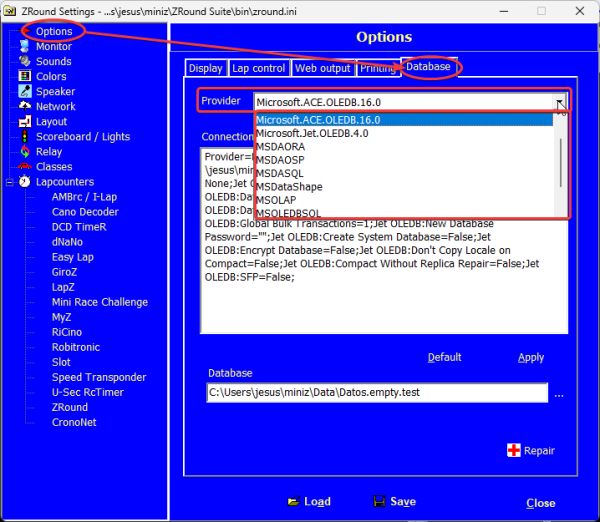
Once done, restart the application


